Getting Started
ShortsNinja offers several paths to start creating videos — whether you're starting from scratch, transforming blog content, or planning to use user-generated content (UGC) in the future. The Home screen helps you choose the best creation method for your project goals.
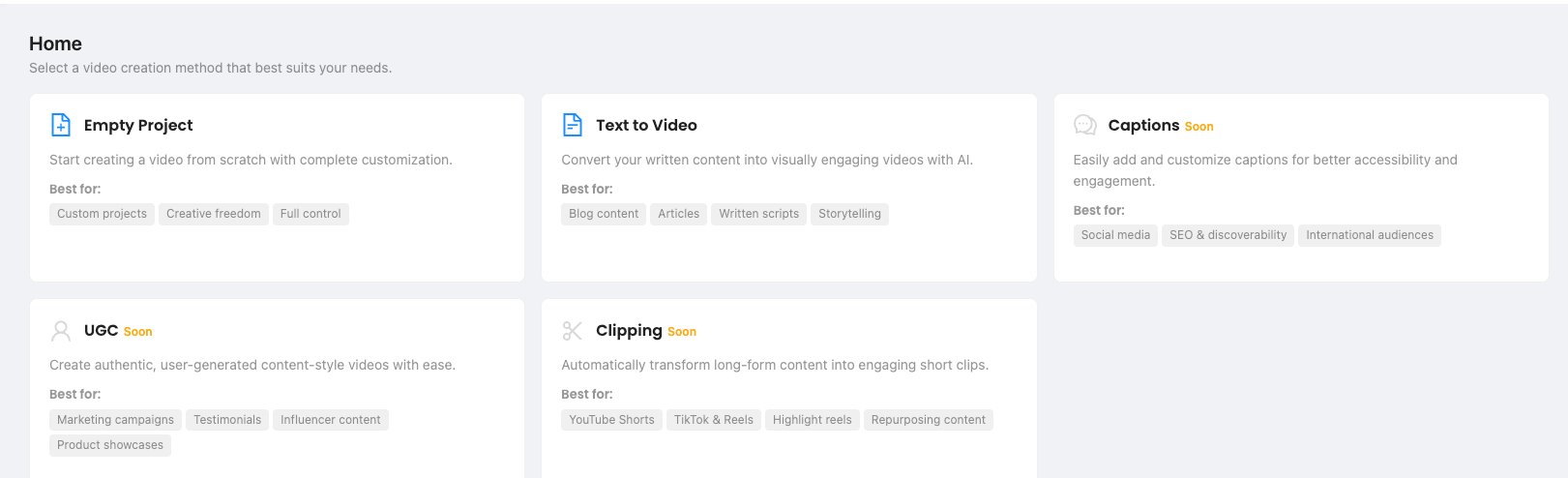
Available Creation Methods
✅ Empty Project
Start from scratch and customize every part of your video.
Best for:
Custom workflows
Full creative control
Unique storytelling formats
✅ Text to Video
Turn any written content — blog post, article, or script — into a stunning video with AI visuals and narration.
Best for:
Blog-to-video repurposing
Scripted educational or storytelling content
Fast idea-to-video workflows
Coming Soon
These features are displayed but not yet available. Stay tuned:
🧠 UGC (User-Generated Content)
Will help create influencer-style or customer testimonial videos with ease.
Planned use cases:
Product showcases
Authentic content for ads
Influencer campaigns
✂️ Clipping
Automatically turns long-form content into engaging short clips.
Planned use cases:
YouTube Shorts
TikTok Reels
Repurposing podcasts, webinars, and more
💬 Captions
Will let you auto-generate and customize captions for accessibility and reach.
Planned use cases:
Boosting SEO/discoverability
Supporting international audiences
Making silent-scrolling content work
🧭 What to Do Next
Choose a method to begin with — Empty Project or Text to Video.
You’ll be guided through script writing, style selection, voiceover, and publishing.
If you’re new, we recommend starting with Text to Video for the fastest results.
Was this helpful?
Still need help? Ask the team