Voiceover Scene Item
Voiceovers are at the heart of AI-generated Shorts — they drive the message, pacing, and tone of each scene. In the video editor, the Voiceover scene item gives you full control over the text, voice, and timing.
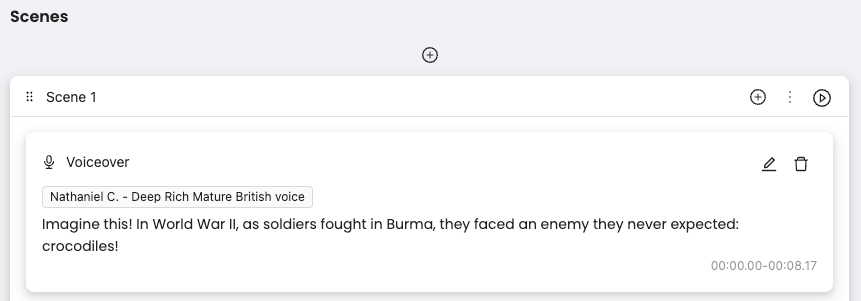
What You See
The voice name and style (e.g., “Nathaniel C. – Deep Rich Mature British voice”)
The spoken text
The duration of the voiceover, automatically calculated based on pacing
Edit (✏️) and delete (🗑️) icons
Editing Voiceover
Click the ✏️ icon to open the editor.
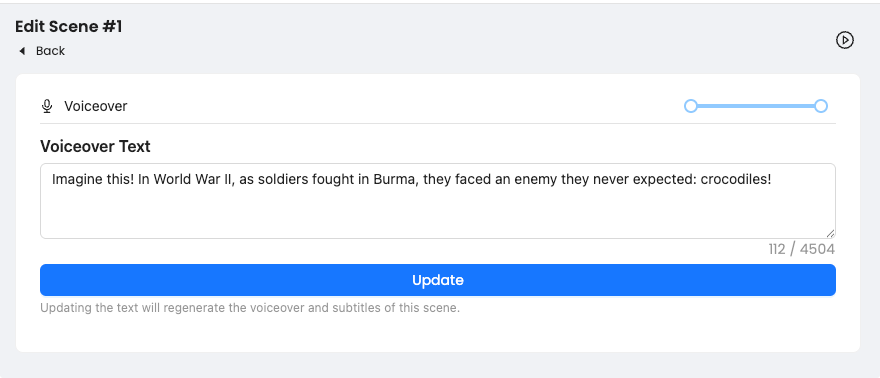
In the edit screen, you can:
Change the voiceover text (this will regenerate the voice using the current voice style)
View the character count
Adjust the duration range using the slider
Once you hit Update, the voiceover will be regenerated and synced to the scene timeline.
Was this helpful?
Still need help? Ask the team